Apply a governed template library with locked export settings and enforce it through tooling. That is the one-sentence answer. If you do nothing else this week, take these three steps: create a master style template with your brand's exact hex colors and embedded fonts, lock your PDF export preset so no reviewer's machine can override your layout, and publish a single approved cover page your whole team uses. Visually cohesive proposals signal professionalism and help evaluators remember your submission. Rfpforgeai's branded export and compliance tracking features let you enforce those standards at scale without manual QA on every file.
- ✅ Create a master style template (MASTER-Proposal.dotx or equivalent)
- ✅ Lock PDF export preset with embedded fonts and sRGB color profile
- ✅ Publish one approved cover page to a shared, version-controlled library
Pro Tip: Tag every template file with a version date in the filename (e.g., MASTER-Proposal-2026-06.dotx) so teams always know which copy is current without opening it.
Table of Contents
- What visual and content elements belong in every branded proposal?
- Which file formats and export settings actually preserve your branding?
- How do you roll out a governed template system step by step?
- What software features should you require for branded proposals at scale?
- How do you measure whether your proposal branding is working?
- Your proposal branding rollout checklist
- Key Takeaways
- The mistake most teams make with proposal branding
- Rfpforgeai cuts the time from RFP to branded draft
- Sources and further reading
What visual and content elements belong in every branded proposal?
Proposal design best practices recommend aligning every proposal touchpoint with your website, business card, and LinkedIn presence. That alignment starts with a defined element set.
Visual identity elements:
- Branded cover page with logo, tagline, and client name field
- Logo placement rules (top-left header, minimum clear space)
- Color palette with exact hex codes (never "Automatic" in Word)
- Typography: one heading font, one body font, both embedded
- Headers and footers with page numbers and document classification
- Signature block with contact details and submission date
- Confidentiality footer on every page
Content structure elements:
- Named content blocks: executive summary, technical approach, pricing table, timeline, compliance matrix
- Merge fields for client name, RFP reference number, and submission date
- Standardized diagram and chart styles (same color fills as brand palette)
- Tone-of-voice guide covering formality level and preferred terminology
For co-branded proposals, keep your supplier brand dominant and place client information in the executive summary header only. Supplier-branded bids generally outperform rebranded ones, but confirm logo usage rights before including a client's mark.
Pro Tip: Build an accessibility check into your template: minimum 12pt body text, 4.5:1 color contrast ratio for body copy, and tagged PDF output for screen readers. Federal procurement increasingly requires it.
Reusable technical proposal writing patterns for executive summaries and win themes slot directly into these content blocks, cutting first-draft time significantly.
Which file formats and export settings actually preserve your branding?
PDF is the safest delivery format for branded proposals. Specifically, export as a high-quality PDF with fonts embedded, sRGB color profile selected, and image resolution at 150 DPI minimum for screen or 300 DPI for print. A hybrid delivery approach that pairs an interactive online proposal with a downloadable PDF covers evaluators on every device and preference.
Technical export checklist:
- ✅ Embed all fonts (never subset below 100%)
- ✅ Set color profile to sRGB for screen; CMYK only when print is confirmed
- ✅ Disable "Automatic" theme colors in Word and PowerPoint before export
- ✅ Set image DPI to 150+ for screen, 300 for print
- ✅ Enable tagged PDF for accessibility
- ✅ Strip or standardize document metadata (author field, company name)
Word's theme system is the most common source of branding drift. Custom Word style templates that avoid theme-linked fonts and use explicit hex color selections prevent Microsoft from overriding your brand on a reviewer's machine.
Pro Tip: Save your master template as a .dotx file and protect it with editing restrictions. Test exports on both Windows and Mac before distributing — font rendering differences between platforms can shift line breaks and break your layout.
How do you roll out a governed template system step by step?
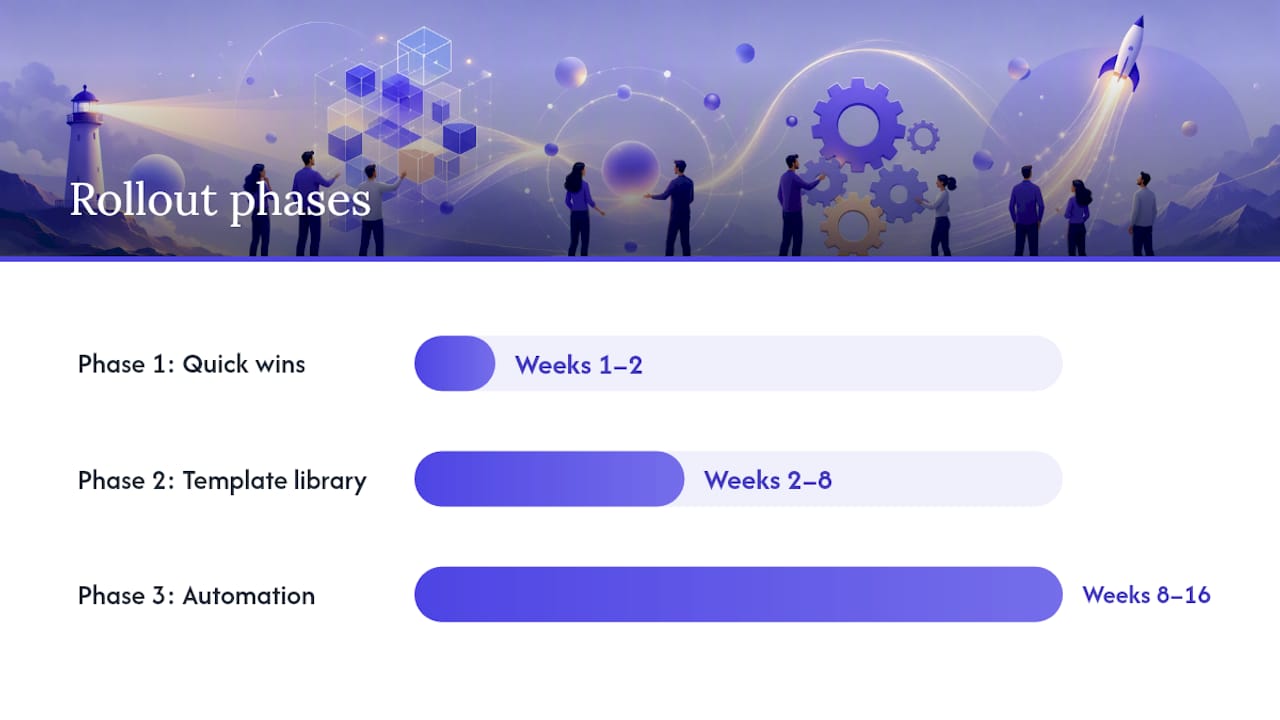
Use a phased approach: pilot first, then build the library, then automate.
Phase 1 (Weeks 1–2): Quick wins
- Create MASTER-Proposal.dotx with locked styles, brand colors, and embedded fonts
- Export one sample PDF and verify fonts, colors, and layout on Windows and Mac
- Publish the approved cover page to a shared drive with a clear naming convention
- Assign one BD lead as template owner
Phase 2 (Weeks 2–8): Template library
- Build section templates: executive summary, technical approach, pricing, timeline, compliance matrix
- Add merge fields for client name, RFP reference, and submission date
- Create a content snippet library for reusable paragraphs (company overview, certifications, past performance)
- Set up an approval flow: writer drafts → BD lead reviews → legal clears confidentiality language
Phase 3 (Weeks 8–16): Automation and governance
- Integrate conditional content rules (e.g., show federal compliance section only for government RFPs)
- Connect analytics to track which template versions correlate with wins
- Run a monthly template review with the BD lead and designer
- Train new team members with a recorded walkthrough of the library
Pro Tip: Capture your proposal win themes as named content blocks in Phase 2. Teams that reuse proven messaging consistently outperform those who rewrite from scratch every time.
What software features should you require for branded proposals at scale?
Mandate these capabilities before committing to any platform: template locking with style enforcement, branded PDF export presets, a content library with merge fields, compliance matrix generation, conditional content rules, approval workflows, and win-rate analytics. Without all of them, governance breaks down as the team grows.
Feature checklist:
- ✅ Locked style templates (fonts, colors, spacing cannot be overridden by users)
- ✅ Branded export presets saved at the account level
- ✅ Content library with reusable blocks and merge fields
- ✅ Automated compliance matrix tied to RFP requirements
- ✅ Conditional content (section visibility based on RFP type or client segment)
- ✅ Approval workflow with version history
- ✅ Win-rate analytics by template, section, and evaluator
Rfpforgeai covers every item on that list. The platform automates requirements extraction, compliance tracking, branded exports, and win-rate analytics in a single workflow, so your team spends time on narrative quality rather than formatting QA.
For teams evaluating proposal software options, the non-negotiable is whether the platform enforces branding at export, not just at the editing stage.
How do you measure whether your proposal branding is working?
Measure three things: template adoption, export fidelity, and win rate by template version. Then run A/B tests on layout variants and executive summary openings to iterate.
| Metric | Data Source | Target | Cadence |
|---|---|---|---|
| Template adoption rate | File naming audit | Most submissions use approved template | Monthly |
| Branded export success | PDF spot-check (fonts, colors) | No style drift observed in sampled proposals | Per sprint |
| Win rate by template | CRM + proposal log | Trending upward quarter over quarter | Quarterly |
| Reviewer rework rate | BD lead feedback log | Under 10% of proposals require reformatting | Monthly |
| Response time | Submission timestamps | Decreasing as library matures | Quarterly |
A simple A/B test: send two executive summary variants to similar-sized opportunities over one quarter and track win rate. Keep the layout constant and change only the opening paragraph structure. That isolates the content variable from the branding variable.
Your proposal branding rollout checklist
Follow this checklist to publish a controlled template library within one month.
- ✅ MASTER-Proposal.dotx created with locked styles and embedded fonts
- ✅ Accessible PDF export preset saved (sRGB, 150 DPI, tagged PDF)
- ✅ Approved cover page published to shared library
- ✅ Content blocks built for: executive summary, approach, pricing, timeline, compliance
- ✅ Merge fields configured for client name, RFP reference, submission date
- ✅ Approval flow documented (writer → BD lead → legal)
- ✅ Analytics connected to CRM for win-rate tracking
- ✅ Team training session scheduled (60 minutes, recorded)
Recommended file naming convention:
MASTER-Proposal-[YYYY-MM].dotxProposal-Cover-Client-[ClientName].pdfSnippet-CompanyOverview-v2.docx
Pro Tip: Assign a single template owner and schedule a 30-minute monthly review. Governance does not require a committee — it requires one accountable person and a calendar invite.
Key Takeaways
Consistent proposal branding requires a governed template library, locked export settings, and tooling that enforces both at scale.
| Point | Details |
|---|---|
| Lock styles at the source | Use a .dotx master template with explicit hex colors and embedded fonts to prevent theme overrides. |
| Control every export | Set sRGB color profile, 150 DPI minimum, and tagged PDF on every branded proposal export. |
| Measure adoption and wins | Track template adoption rate and win rate by template version on a monthly and quarterly cadence. |
| Phase your rollout | Pilot in weeks 1–2, build the library by week 8, and add automation and analytics by week 16. |
| Use Rfpforgeai to scale | Rfpforgeai automates requirements extraction, compliance matrices, branded exports, and win-rate analytics in one platform. |
The mistake most teams make with proposal branding
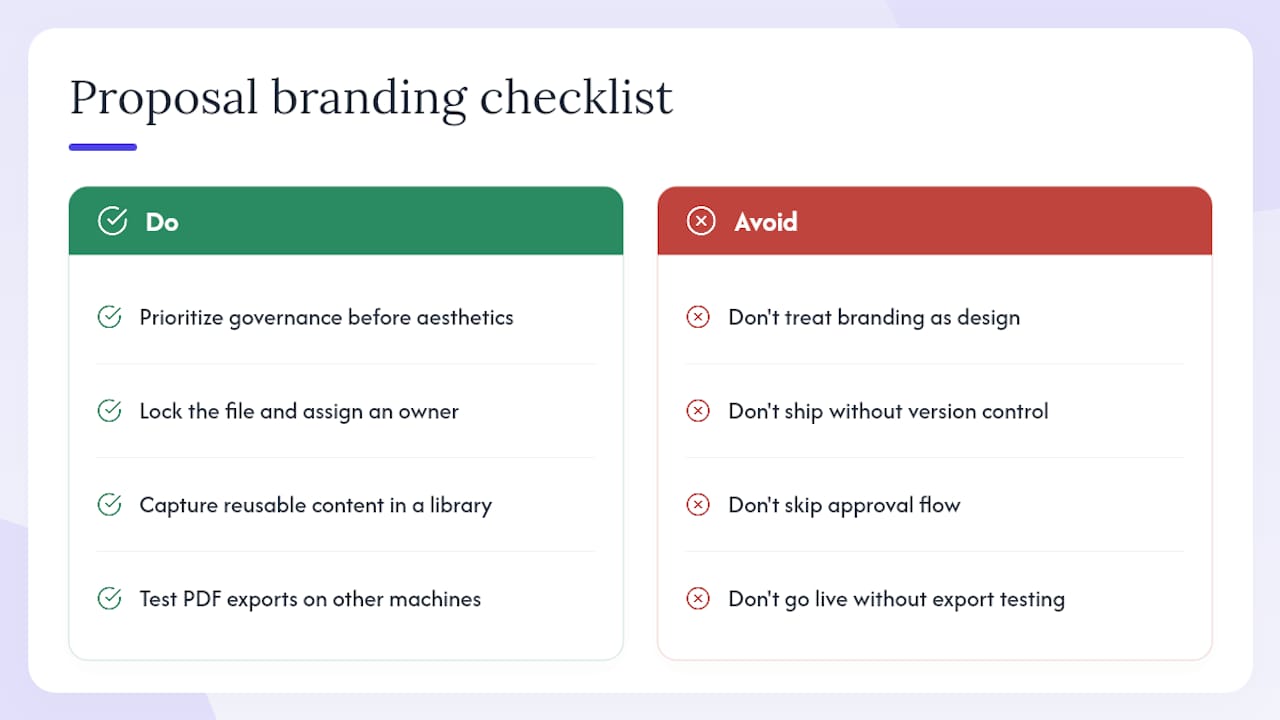
The biggest implementation mistake is treating branding as a design task rather than a governance task. Teams spend days perfecting a cover page, then ship it with no version control, no approval flow, and no export preset. Six months later, five different cover pages are in circulation and nobody knows which is current.
Three lessons stand out from working with BD teams on this:
Governance before aesthetics. A mediocre template with strict version control outperforms a beautiful one that nobody enforces. Lock the file, name it clearly, and assign an owner before you refine the design.
Content reuse is where the time savings actually live. The cover page takes an hour to build. The executive summary, past performance paragraphs, and compliance language take weeks to write well. Capture those in a content library and the ROI compounds with every proposal.
Test exports before you go live. Font rendering differences between Windows and Mac have broken more proposals than bad design ever has. Export to PDF, open it on a different machine, and check every heading before you call the template done.
Rfpforgeai cuts the time from RFP to branded draft
Rfpforgeai gives BD teams a faster path from raw RFP to a compliant, branded proposal export than any manual template workflow. Upload an RFP and the platform extracts every requirement automatically, scores your fit, and flags gaps through an AI-driven Q&A. Your brand's fonts, colors, and cover page are locked at the account level, so every export looks identical regardless of who drafted it.
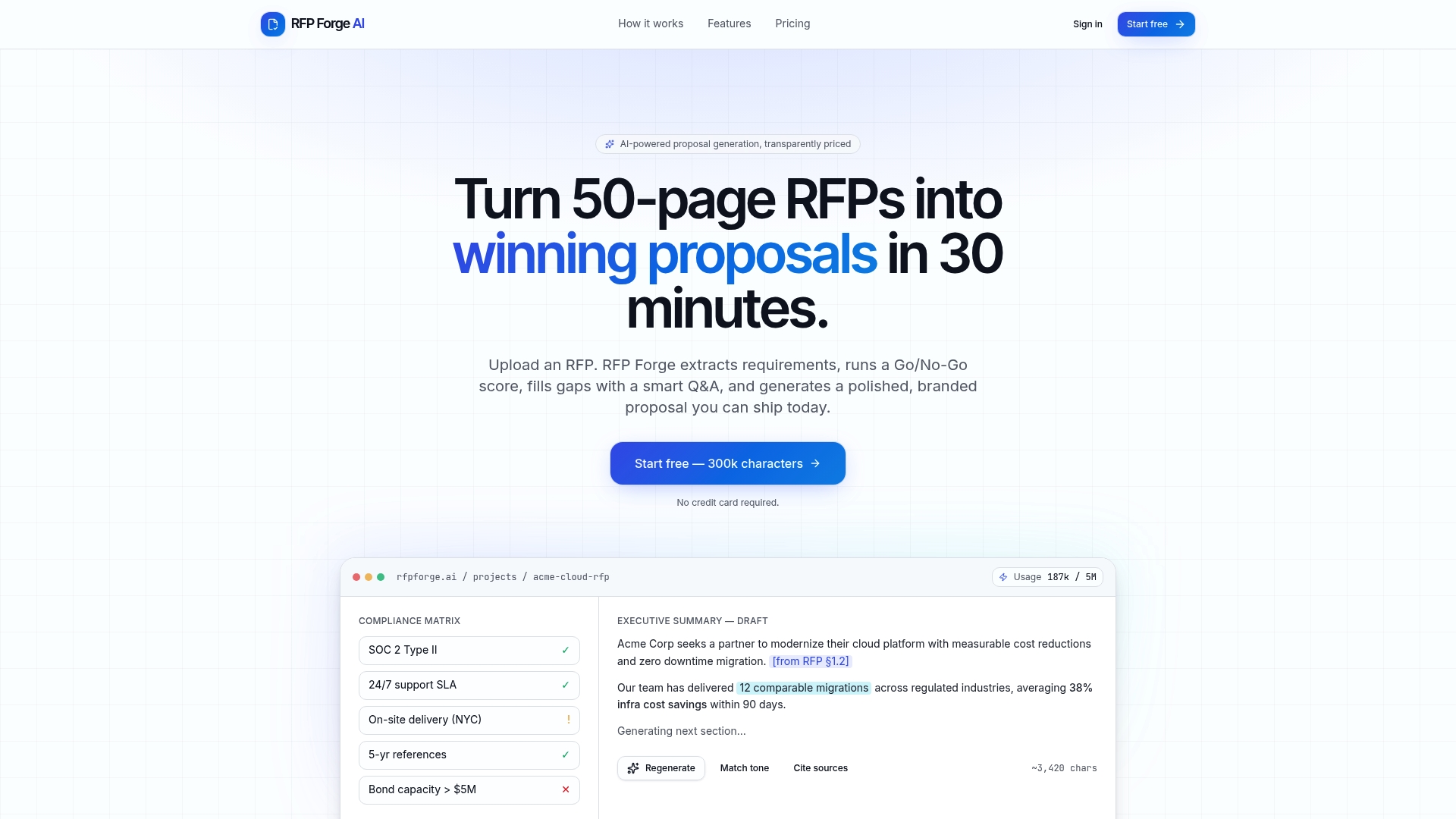
The compliance matrix, executive summary, pricing section, and timeline all generate within the same session. Win-rate analytics then show you which template versions and section approaches correlate with closed deals, so you iterate on evidence rather than instinct. For teams in regulated industries, the platform's compliance tracking reduces the audit risk that comes with inconsistent formatting.
Start a free trial at rfpforgeai.com and publish your first governed, branded proposal draft today.
Sources and further reading
Cited sources:
- RFP Templates Create Great Looking Sales Proposals | SalesEdge
- Branding Your Bids: Mastering Cohesion in RFPs with Visuals
- Proposal Design Best Practices — Look Professional
- Professional Proposal Design: 9 Tips That Win Clients in 2026 | Proposal Air
- How should you brand your proposal documentation? | Bid Solutions
- RFP Forge AI — Generate Winning Proposals with AI
- Technical Proposal Writing: A Practical Guide for Professionals
Further reading on the Rfpforgeai blog:
- Best Proposal Software for RFP Teams — Platform comparison for teams selecting governance-ready proposal tools
- Proposal Win Themes That Actually Win Bids — How to capture proven messaging as reusable content blocks